AlloyDB Express: Postgres en la nube listo en segundos (y que se pausa solo)
Google Cloud lanzó en preview AlloyDB Express: un PostgreSQL 18 que se crea en unos segundos, se pausa tras 15 minutos sin tráfico y sube a AlloyDB de producción con un clic. Resumen de cifras y límites oficiales.
AlloyDB Express: cloud Postgres ready in seconds (and it pauses itself)
Google Cloud launched AlloyDB Express in preview: PostgreSQL 18 that provisions in seconds, pauses after 15 idle minutes, and upgrades in place to production AlloyDB. Official numbers and limits, in brief.
El 4 de noviembre de 2026, Google Cloud anunció en previewAlloyDB Express, una configuración de AlloyDB for PostgreSQL pensada para prototipos rápidos y para flujos donde un agente de código necesita una base de datos ya, no en minutos. La promesa central: crear un PostgreSQL usable en segundos, pausar el cómputo cuando no hay tráfico y, cuando el proyecto madure, subir a AlloyDB de producción sin reescribir la app.
Qué cambia para quien construye producto
Según el anuncio oficial, AlloyDB Express apunta a tres fricciones habituales: el aprovisionamiento lento de bases en pipelines y demos, el coste de dejar instancias encendidas “por si acaso”, y el salto doloroso de un sandbox a un entorno con alta disponibilidad. Google Cloud describe la oferta como agent-ready: mismos controles de IAM, red y políticas de organización para lo que cree un humano o un agente.
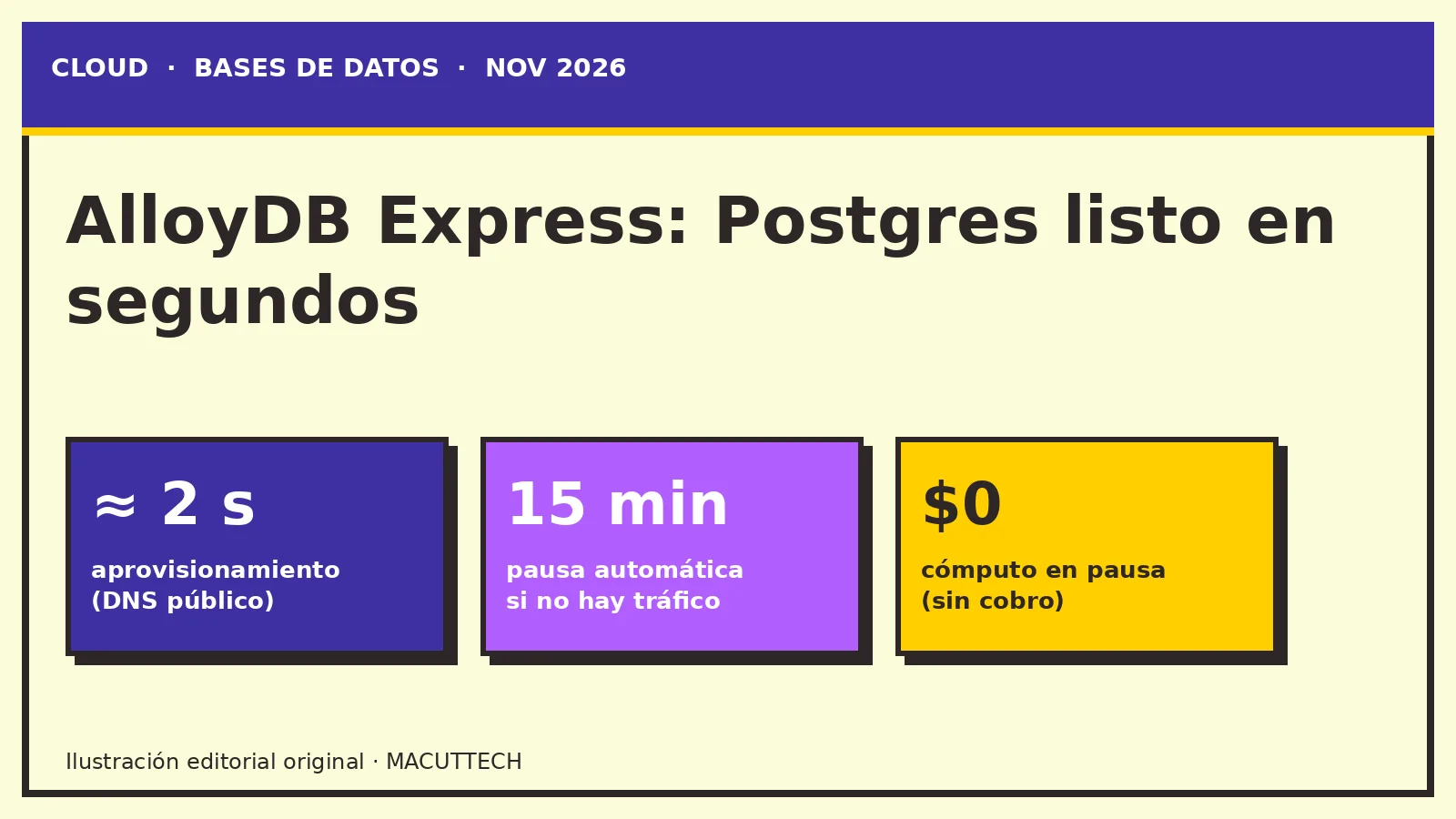
Listo para conectar: ≈ 2 segundos con DNS público y ≈ 20 segundos con Private Service Connect (PSC).
Pausa automática: tras 15 minutos sin actividad el cómputo baja a cero; al llegar una consulta nueva, reanuda en ≈ 20 segundos.
Tamaño: instancias zonales de 1 vCPU (4 GB) o 2 vCPU (8 GB); almacenamiento autoescalable hasta 20 GB.
Motor:PostgreSQL 18 únicamente, con funciones de AlloyDB AI (búsqueda vectorial ScaNN / pgvector, y helpers SQL hacia modelos Gemini).
Estado:Preview (Pre-GA); sin SLA; sin backups ni HA regional en Express.
Express frente a AlloyDB
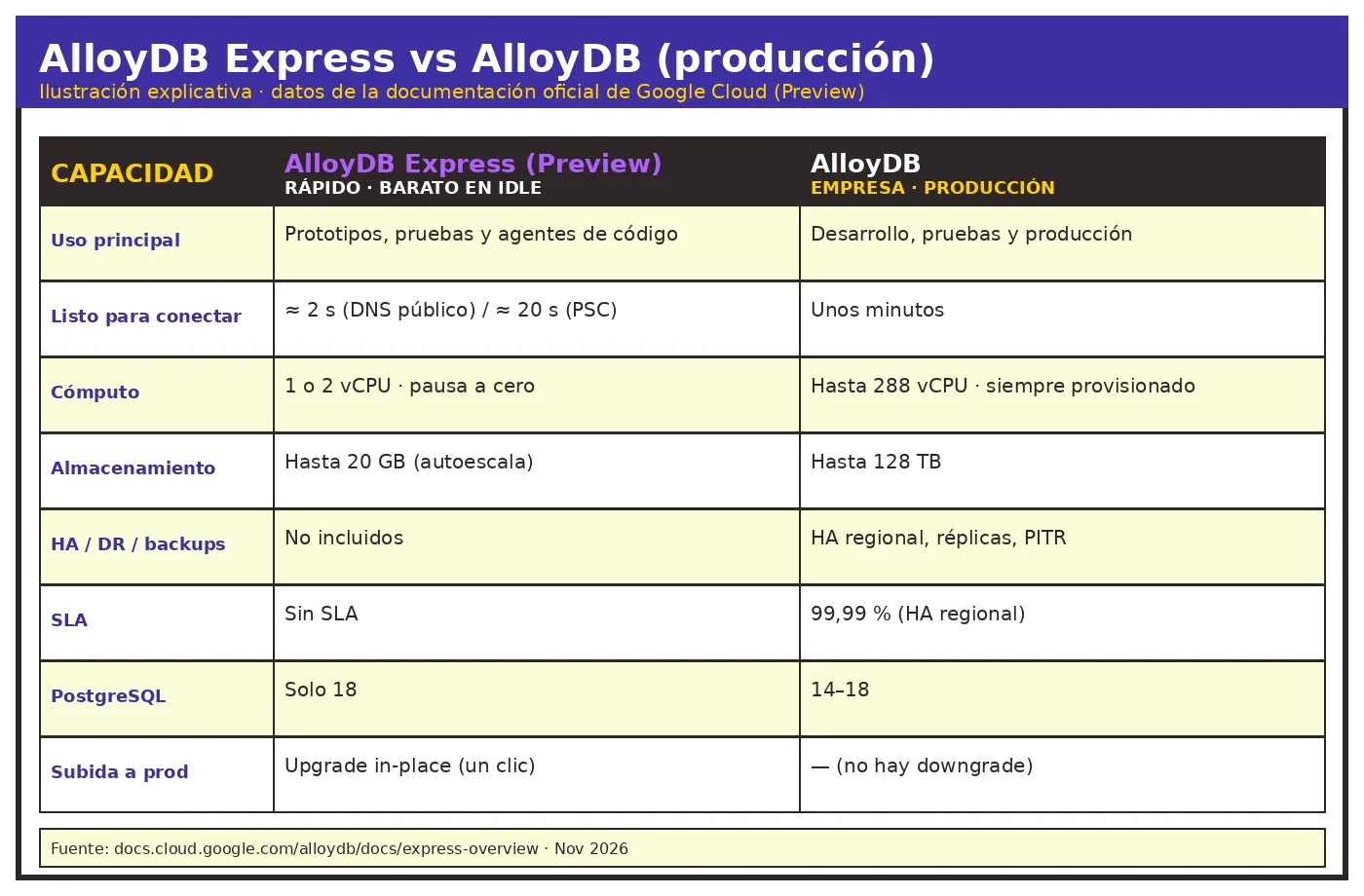
La tabla oficial deja clara la frontera: Express acelera el ciclo de prueba; AlloyDB cubre producción (hasta 288 vCPU, HA regional con SLA 99,99 %, réplicas, PITR y almacenamiento hasta 128 TB). El camino hacia producción es un upgrade in-place: se conservan datos, esquemas, usuarios y la cadena de conexión; no hay downgrade de vuelta a Express.
Paso 1 de 4
≈ 2 s
Instancia lista para conectar con DNS público. Con PSC, ≈ 20 s.
1. Aprovisionar
Según la documentación, una instancia Express acepta conexiones en ≈ 2 segundos con DNS público y en 20 segundos con un endpoint de Private Service Connect. El anuncio lo resume como una base lista “en menos de dos segundos”.
2. Pausar
Tras 15 minutos de inactividad el cómputo se pausa (scale-to-zero). En la página de precios, el cómputo en pausa aparece como USD 0,00 / hora cuando lleva más de 15 minutos idle. El almacenamiento sí se sigue cobrando.
3. Reanudar
Cuando llega una consulta o una conexión nueva, la instancia reanuda la operación en aproximadamente 20 segundos, según la guía de Express.
4. Subir a producción
El camino documentado es un upgrade in-place a AlloyDB: se conservan datos, esquemas, usuarios y la cadena de conexión, y dejan de aplicar el techo de 20 GB y el de 2 vCPU. No hay downgrade de vuelta a Express.
Ilustración explicativa con datos de la documentación oficial de Google Cloud (nov 2026).
Comparativa oficial
Express frente a AlloyDB (datos de la documentación)
Haz clic en un encabezado para ordenar. Cifras tomadas de la tabla de la AlloyDB Express overview. No inventamos filas.
Tema
AlloyDB Express
AlloyDB
Tiempo de aprovisionamiento
≈ 2 s con DNS público; 20 s con PSC
En unos minutos
Cómputo
1 vCPU o 2 vCPU, zonal
Hasta 288 vCPU; hasta 20 nodos de read pool
Comportamiento en reposo
Escala a cero cuando no hay tráfico
Siempre aprovisionado
Almacenamiento
Autoescala hasta 20 GB
Autoescala hasta 128 TB
Alta disponibilidad
No soportada; solo instancias zonales
HA regional con failover automático
Recuperación ante desastres
No soportada
Replicación entre regiones, hasta cinco clústeres secundarios
SLA
Sin SLA
SLA de 99,99 % de uptime en clústeres con HA regional
Backups
No soportados
Backups automáticos y bajo demanda, PITR
Upgrade
In-place a AlloyDB; sin downgrade
—
Precios (lo publicado)
En el blog y la página de precios, Google Cloud resume el modelo de Express así (ejemplo US / us-west1 donde aplica):
Concepto
Valor publicado
Cómputo activo
USD 0,115 por unidad de cómputo (CU) y hora, facturado por segundo
Cómputo en pausa
USD 0,00 / hora tras >15 min idle
Almacenamiento usado
USD 0,30 / GB-mes (hasta 20 GB; se cobra también en pausa)
Free tier (12 primeros meses)
50 CU + 2 GB de almacenamiento por cuenta de facturación / mes
Facturación de Express
Empieza en diciembre 2026
Los precios por región varían (por ejemplo, europe-west2 lista cómputo a USD 0,131 / CU-h). Conviene contrastar siempre la página de precios antes de presupuestar.
Gráfica · tabla oficial
Cómputo Express por región (USD / CU-hora)
Solo las siete regiones publicadas en la tabla «AlloyDB Express Compute» de la página de precios. La barra más larga es asia-east2 (USD 0,161), el máximo de esa tabla. 1 CU = 1 vCPU y 4 GB de memoria.
us-west1
USD 0,115
europe-west2
USD 0,131
asia-east1
USD 0,133
asia-southeast1
USD 0,141
australia-southeast1
USD 0,144
asia-northeast1
USD 0,147
asia-east2
USD 0,161
Cómputo activo: USD 0,115 por hora de unidad de cómputo (CU-hora), facturado por segundo. Cómputo en pausa: USD 0,00 por hora cuando está inactivo durante más de 15 min. Almacenamiento usado: USD 0,30 por GB-mes.
— Google Cloud Blog, Introducing AlloyDB Express, 4 nov 2026 (resumen de precios del anuncio; us-west1 lista los mismos USD 0,115 y USD 0,30 en la tabla de Express). Original: “Active compute: $0.115 per Compute Unit hour (CU-hr), billed by the second. Paused compute: $0.00 per hour when idle for more than 15 mins. Used storage: $0.30 per GB-month.”
Ejemplo oficial de un día
US_CENTRAL1 · 1 CU · 10 GB · 5 horas activas
La página de precios publica este worked example (asume 730 horas al mes): cómputo USD 0,115 × 5 h = USD 0,575; almacenamiento USD 0,30 / mes ÷ 730 h × 24 h × 10 GB = USD 0,098; total del día = USD 0,674. US_CENTRAL1 aparece en el ejemplo, no en la tabla regional de Express; esos USD 0,115 y USD 0,30 coinciden con us-west1.
Cómputo (5 h)
USD 0,575
Almacenamiento
USD 0,098
# Ejemplo oficial, página de precios de AlloyDB Express
# Región: US_CENTRAL1 · 1 CU · 10 GB · 5 horas activas en un día
# Mes de 730 horas (supuesto publicado)
Compute: 1 CU × USD 0.115/h × 5 h = USD 0.575
Storage: USD 0.30/GB-month ÷ 730 h × 24 h × 10 GB = USD 0.098
Total: USD 0.674
Calculadora de costo y pausa
La cuenta usa solo tarifas publicadas en la tabla de Express (cómputo y almacenamiento por región) y la fórmula del ejemplo oficial (mes de 730 horas). El cómputo en pausa entra como USD 0,00. No proyectamos descuentos ni monedas distintas al USD de la ficha.
Seguridad y conectividad (resumen)
Express no abre “un Postgres suelto” sin guardrails: DNS público enmascara la IP y bloquea tráfico entrante hasta que se permita; PSC / DNS privado cubren cargas internas; IAM, VPC Service Controls y roles nativos de PostgreSQL siguen aplicando. CMEK, backups automáticos y HA regional no están en Express: si los necesitas, el camino es el upgrade a AlloyDB.
Checklist
Límites publicados de Express
Marca lo que ya revisaste. Todo sale de la overview y de la página de precios, no de interpretaciones nuestras.
Para quién tiene sentido (y para quién no)
Tiene sentido si montas demos, CI efímero, sandboxes por feature o bases que un agente crea y abandona en la misma sesión. No sustituye un AlloyDB (o Cloud SQL) de producción: sin SLA, sin backups nativos y con techo de 20 GB, Express es un acelerador de desarrollo, no el destino final de datos críticos.
Preguntas frecuentes
¿En cuánto tiempo queda lista una instancia?
La documentación indica aproximadamente 2 segundos con DNS público y 20 segundos con Private Service Connect. El anuncio del blog lo resume como una base lista en menos de dos segundos.
¿Cuándo se pausa el cómputo y cuánto cuesta en pausa?
Tras 15 minutos sin actividad el cómputo escala a cero. La ficha de precios lista el cómputo en pausa a USD 0,00 / hora cuando lleva más de 15 minutos idle. El almacenamiento se cobra también en pausa, hasta 20 GB.
¿Cuánto tarda en reanudar?
Cuando llega una consulta o una conexión nueva, la instancia reanuda en aproximadamente 20 segundos, según la AlloyDB Express overview.
¿Qué tamaños y qué motor hay?
Instancias zonales de 1 vCPU (4 GB) o 2 vCPU (8 GB), que equivalen a 1 y 2 compute units. El almacenamiento autoescala hasta 20 GB. El motor es PostgreSQL 18 únicamente, con funciones de AlloyDB AI.
¿Hay SLA, backups o HA regional?
No. Express está en Preview (Pre-GA), no tiene SLA, no soporta backups ni HA regional. Esas capacidades aparecen en AlloyDB de producción, incluido un SLA de 99,99 % de uptime en clústeres con HA regional.
¿Puedo volver a Express después de subir a AlloyDB?
No. El camino documentado es un upgrade in-place (se conservan datos, esquemas, usuarios y la cadena de conexión) y no hay downgrade de vuelta a Express.
¿Cuánto es el free tier y cuándo empieza la facturación?
Cada mes, durante los primeros 12 meses, incluye 50 compute units y 2 GB de almacenamiento por cuenta de facturación. La facturación de Express empieza en diciembre 2026. Los precios de cómputo se facturan por segundo.
Si estás evaluando Postgres en la nube, agentes o un entorno de prueba que no se deje el presupuesto encendido, te ayudamos a diseñarlo y a llevarlo a producción cuando toque. Trabajamos desde Barranquilla, en remoto para LATAM.
<div class="mt-fx" data-mt-fx="piloto-alloydb" hidden></div>
<p>On November 4, 2026, <a href="https://cloud.google.com/blog/products/databases/introducing-alloydb-express-for-rapid-testing-and-prototyping" target="_blank" rel="noopener noreferrer">Google Cloud announced</a> <strong>AlloyDB Express</strong> in <em>preview</em>: an AlloyDB for PostgreSQL configuration built for fast prototypes and for workflows where a coding agent needs a database <em>now</em>, not in a few minutes. The pitch: spin up usable PostgreSQL in seconds, pause compute when traffic stops, and later upgrade in place to production AlloyDB without rewriting the app.</p>
<h2 id="what-changes-for-product-teams">What changes for product teams</h2>
<p>Per the <a href="https://cloud.google.com/blog/products/databases/introducing-alloydb-express-for-rapid-testing-and-prototyping" target="_blank" rel="noopener noreferrer">official announcement</a>, Express targets three common frictions: slow database spin-up in pipelines and demos, the cost of leaving instances “always on just in case,” and a painful jump from sandbox to a highly available environment. Google Cloud frames it as <em>agent-ready</em>: the same IAM, network, and organization policies apply whether a human or an agent creates the database.</p>
<p>Key figures (<a href="https://docs.cloud.google.com/alloydb/docs/express-overview" target="_blank" rel="noopener noreferrer">official docs</a> and <a href="https://cloud.google.com/blog/products/databases/introducing-alloydb-express-for-rapid-testing-and-prototyping" target="_blank" rel="noopener noreferrer">blog</a>):</p>
<div class="mt-fx-stats mt-fx-reveal" aria-label="Official AlloyDB Express key figures">
<div class="mt-fx-stat">
<span class="mt-fx-count" data-mt-count data-mt-target="2" data-mt-suffix=" s" data-mt-approx="1">≈ 2 s</span>
<span class="mt-fx-stat-label">Ready over public DNS</span>
</div>
<div class="mt-fx-stat">
<span class="mt-fx-count" data-mt-count data-mt-target="15" data-mt-suffix=" min">15 min</span>
<span class="mt-fx-stat-label">Automatic pause when idle</span>
</div>
<div class="mt-fx-stat">
<span class="mt-fx-count" data-mt-count data-mt-target="20" data-mt-suffix=" s" data-mt-approx="1">≈ 20 s</span>
<span class="mt-fx-stat-label">Resume on a new query</span>
</div>
<div class="mt-fx-stat">
<span class="mt-fx-count" data-mt-count data-mt-target="20" data-mt-suffix=" GB">20 GB</span>
<span class="mt-fx-stat-label">Storage ceiling</span>
</div>
<div class="mt-fx-stat">
<span class="mt-fx-count" data-mt-count data-mt-target="50" data-mt-suffix=" CUs">50 CUs</span>
<span class="mt-fx-stat-label">Free tier / month (12 months)</span>
</div>
</div>
<ul>
<li><strong>Ready to connect:</strong> about <strong>2 seconds</strong> over public DNS and about <strong>20 seconds</strong> over Private Service Connect (PSC).</li>
<li><strong>Automatic pause:</strong> after <strong>15 minutes</strong> idle, compute scales to zero; a new query resumes the instance in about <strong>20 seconds</strong>.</li>
<li><strong>Size:</strong> zonal <strong>1 vCPU (4 GB)</strong> or <strong>2 vCPU (8 GB)</strong> instances; storage autoscales up to <strong>20 GB</strong>.</li>
<li><strong>Engine:</strong> <strong>PostgreSQL 18</strong> only, with AlloyDB AI features (ScaNN / <code>pgvector</code> vector search, and SQL helpers that call Gemini models).</li>
<li><strong>Status:</strong> <em>Preview</em> (Pre-GA); no SLA; no backups or regional HA in Express.</li>
</ul>
<h2 id="express-vs-alloydb">Express vs AlloyDB</h2>
<p>The <a href="https://docs.cloud.google.com/alloydb/docs/express-overview" target="_blank" rel="noopener noreferrer">official comparison table</a> draws a hard line: Express speeds up the test loop; AlloyDB covers production (up to 288 vCPUs, regional HA with a 99.99% SLA, replicas, PITR, and storage up to 128 TB). The path to production is an <strong>in-place upgrade</strong>—data, schemas, users, and the connection string stay put—and <strong>there is no downgrade</strong> back to Express.</p>
<div class="mt-fx-scrolly">
<div class="mt-blog-sticky-media mt-fx-scene" data-mt-scene data-state="0">
<p class="mt-fx-scene-step" data-mt-scene-kicker>Step 1 of 4</p>
<p class="mt-fx-scene-value" data-mt-scene-value>≈ 2 s</p>
<p class="mt-fx-scene-label" data-mt-scene-label>Instance ready to accept connections over public DNS. Over PSC, about 20 s.</p>
</div>
<div class="mt-fx-scrolly-steps">
<section class="mt-fx-step is-current" data-mt-step="0" data-mt-scene-kicker="Step 1 of 4" data-mt-scene-value="≈ 2 s" data-mt-scene-label="Instance ready to accept connections over public DNS. Over PSC, about 20 s.">
<h3>1. Provision</h3>
<p>Per the docs, an Express instance accepts connections in about 2 seconds over public DNS and in 20 seconds over a Private Service Connect endpoint. The announcement describes a database ready “in under two seconds.”</p>
</section>
<section class="mt-fx-step" data-mt-step="1" data-mt-scene-kicker="Step 2 of 4" data-mt-scene-value="15 min" data-mt-scene-label="With no traffic, compute scales to zero. Paused compute is listed at USD 0.00 / hour.">
<h3>2. Pause</h3>
<p>After 15 minutes of inactivity, compute pauses (scale-to-zero). On the pricing page, paused compute is listed at <strong>USD 0.00 / hour</strong> when idle for more than 15 minutes. Storage is still billed.</p>
</section>
<section class="mt-fx-step" data-mt-step="2" data-mt-scene-kicker="Step 3 of 4" data-mt-scene-value="≈ 20 s" data-mt-scene-label="A new query or connection resumes the instance in about 20 seconds.">
<h3>3. Resume</h3>
<p>When a new query or connection arrives, the instance resumes operation in approximately 20 seconds, according to the <a href="https://docs.cloud.google.com/alloydb/docs/express-overview" target="_blank" rel="noopener noreferrer">Express overview</a>.</p>
</section>
<section class="mt-fx-step" data-mt-step="3" data-mt-scene-kicker="Step 4 of 4" data-mt-scene-value="1 click" data-mt-scene-label="In-place upgrade to AlloyDB: data, schemas, users, and the connection string stay put. There is no downgrade.">
<h3>4. Move to production</h3>
<p>The documented path is an in-place upgrade to AlloyDB: data, schemas, users, and the connection string are kept, and the 20 GB and 2 vCPU caps no longer apply. <strong>There is no downgrade</strong> back to Express.</p>
</section>
</div>
</div>
<figure class="mt-fx-reveal">
<img src="https://www.macuttech.com/uploads/UI1xHnoVfHgLSQqL1ObG%5F-diagram-alloydb-express-vs-alloydb-en.webp" alt="Comparison table of AlloyDB Express (Preview) versus production AlloyDB" width="1400" height="920" style="max-width:100%;height:auto;">
<figcaption>Explanatory illustration using figures from official Google Cloud documentation (Nov 2026).</figcaption>
</figure>
<div class="mt-fx-panel mt-fx-reveal">
<span class="mt-fx-kicker">Official comparison</span>
<h3 class="mt-fx-panel-title">Express vs AlloyDB (from the documentation)</h3>
<p class="mt-fx-caption">Click a header to sort. Figures come from the table in the <a href="https://docs.cloud.google.com/alloydb/docs/express-overview" target="_blank" rel="noopener noreferrer">AlloyDB Express overview</a>. No invented rows.</p>
<table class="mt-fx-sortable">
<thead>
<tr>
<th scope="col">Topic</th>
<th scope="col">AlloyDB Express</th>
<th scope="col">AlloyDB</th>
</tr>
</thead>
<tbody>
<tr>
<td>Provisioning time</td>
<td>About 2 s over public DNS; 20 s over PSC</td>
<td>Within a few minutes</td>
</tr>
<tr>
<td>Compute</td>
<td>1 vCPU or 2 vCPU, zonal</td>
<td>Up to 288 vCPUs; up to 20 read pool nodes</td>
</tr>
<tr>
<td>Idle behavior</td>
<td>Scales to zero when there is no traffic</td>
<td>Always provisioned</td>
</tr>
<tr>
<td>Storage</td>
<td>Autoscales up to 20 GB</td>
<td>Autoscales up to 128 TB</td>
</tr>
<tr>
<td>High availability</td>
<td>Not supported; zonal instances only</td>
<td>Regional HA with automatic failover</td>
</tr>
<tr>
<td>Disaster recovery</td>
<td>Not supported</td>
<td>Cross-region replication, up to five secondary clusters</td>
</tr>
<tr>
<td>SLA</td>
<td>No SLA</td>
<td>99.99% uptime SLA for regional HA clusters</td>
</tr>
<tr>
<td>Backups</td>
<td>Not supported</td>
<td>Automated and on-demand backups, PITR</td>
</tr>
<tr>
<td>Upgrade</td>
<td>In-place to AlloyDB; no downgrade</td>
<td>—</td>
</tr>
</tbody>
</table>
</div>
<h2 id="pricing-as-published">Pricing (as published)</h2>
<p>From the blog and the <a href="https://cloud.google.com/alloydb/pricing" target="_blank" rel="noopener noreferrer">pricing page</a>, Express billing looks like this (US / us-west1 figures where listed):</p>
<table>
<thead>
<tr>
<th scope="col">Item</th>
<th scope="col">Published value</th>
</tr>
</thead>
<tbody>
<tr>
<td>Active compute</td>
<td><strong>USD 0.115</strong> per compute unit (CU) hour, billed per second</td>
</tr>
<tr>
<td>Paused compute</td>
<td><strong>USD 0.00</strong> / hour after >15 min idle</td>
</tr>
<tr>
<td>Used storage</td>
<td><strong>USD 0.30</strong> / GB-month (up to 20 GB; billed while paused too)</td>
</tr>
<tr>
<td>Free tier (first 12 months)</td>
<td><strong>50 CUs</strong> + <strong>2 GB</strong> storage per billing account / month</td>
</tr>
<tr>
<td>Express billing start</td>
<td><strong>December 2026</strong></td>
</tr>
</tbody>
</table>
<p>Regional rates differ (for example, europe-west2 lists compute at USD 0.131 / CU-h). Always check the live <a href="https://cloud.google.com/alloydb/pricing" target="_blank" rel="noopener noreferrer">pricing page</a> before budgeting.</p>
<div class="mt-fx-panel mt-fx-reveal">
<span class="mt-fx-kicker">Chart · official table</span>
<h3 class="mt-fx-panel-title">Express compute by region (USD / CU-hour)</h3>
<p class="mt-fx-caption">Only the seven regions published in the “AlloyDB Express Compute” table on the <a href="https://cloud.google.com/alloydb/pricing" target="_blank" rel="noopener noreferrer">pricing page</a>. The longest bar is asia-east2 (USD 0.161), the maximum in that table. 1 CU = 1 vCPU and 4 GB of memory.</p>
<div class="mt-fx-chart" data-mt-chart>
<div class="mt-fx-chart-row">
<span class="mt-fx-chart-label">us-west1</span>
<div class="mt-fx-chart-track"><div class="mt-fx-chart-fill" style="--mt-fx-bar: 0.714;"></div></div>
<span class="mt-fx-chart-val">USD 0.115</span>
</div>
<div class="mt-fx-chart-row">
<span class="mt-fx-chart-label">europe-west2</span>
<div class="mt-fx-chart-track"><div class="mt-fx-chart-fill" style="--mt-fx-bar: 0.814;"></div></div>
<span class="mt-fx-chart-val">USD 0.131</span>
</div>
<div class="mt-fx-chart-row">
<span class="mt-fx-chart-label">asia-east1</span>
<div class="mt-fx-chart-track"><div class="mt-fx-chart-fill" style="--mt-fx-bar: 0.826;"></div></div>
<span class="mt-fx-chart-val">USD 0.133</span>
</div>
<div class="mt-fx-chart-row">
<span class="mt-fx-chart-label">asia-southeast1</span>
<div class="mt-fx-chart-track"><div class="mt-fx-chart-fill" style="--mt-fx-bar: 0.876;"></div></div>
<span class="mt-fx-chart-val">USD 0.141</span>
</div>
<div class="mt-fx-chart-row">
<span class="mt-fx-chart-label">australia-southeast1</span>
<div class="mt-fx-chart-track"><div class="mt-fx-chart-fill" style="--mt-fx-bar: 0.894;"></div></div>
<span class="mt-fx-chart-val">USD 0.144</span>
</div>
<div class="mt-fx-chart-row">
<span class="mt-fx-chart-label">asia-northeast1</span>
<div class="mt-fx-chart-track"><div class="mt-fx-chart-fill" style="--mt-fx-bar: 0.913;"></div></div>
<span class="mt-fx-chart-val">USD 0.147</span>
</div>
<div class="mt-fx-chart-row">
<span class="mt-fx-chart-label">asia-east2</span>
<div class="mt-fx-chart-track"><div class="mt-fx-chart-fill" style="--mt-fx-bar: 1;"></div></div>
<span class="mt-fx-chart-val">USD 0.161</span>
</div>
</div>
</div>
<figure class="mt-fx-quote mt-fx-reveal">
<blockquote>
<p>Active compute: $0.115 per Compute Unit hour (CU-hr), billed by the second. Paused compute: $0.00 per hour when idle for more than 15 mins. Used storage: $0.30 per GB-month.</p>
</blockquote>
<figcaption class="mt-fx-quote-attr">— Google Cloud Blog, <cite>Introducing AlloyDB Express</cite>, Nov 4, 2026 (pricing summary in the announcement; us-west1 lists the same USD 0.115 and USD 0.30 in the Express table).</figcaption>
</figure>
<div class="mt-fx-panel mt-fx-panel--cream mt-fx-reveal">
<span class="mt-fx-kicker">Official one-day example</span>
<h3 class="mt-fx-panel-title">US_CENTRAL1 · 1 CU · 10 GB · 5 active hours</h3>
<p>The <a href="https://cloud.google.com/alloydb/pricing" target="_blank" rel="noopener noreferrer">pricing page</a> publishes this worked example (assuming a 730-hour month): compute USD 0.115 × 5 h = <strong>USD 0.575</strong>; storage USD 0.30 / month ÷ 730 h × 24 h × 10 GB = <strong>USD 0.098</strong>; total for the day = <strong>USD 0.674</strong>. US_CENTRAL1 appears in the example, not in the Express regional table; those USD 0.115 and USD 0.30 rates match us-west1.</p>
<div class="mt-fx-chart" data-mt-chart>
<div class="mt-fx-chart-row">
<span class="mt-fx-chart-label">Compute (5 h)</span>
<div class="mt-fx-chart-track"><div class="mt-fx-chart-fill" style="--mt-fx-bar: 0.853;"></div></div>
<span class="mt-fx-chart-val">USD 0.575</span>
</div>
<div class="mt-fx-chart-row">
<span class="mt-fx-chart-label">Storage</span>
<div class="mt-fx-chart-track"><div class="mt-fx-chart-fill" style="--mt-fx-bar: 0.145;"></div></div>
<span class="mt-fx-chart-val">USD 0.098</span>
</div>
</div>
<pre><code># Official example, AlloyDB Express pricing page
# Region: US_CENTRAL1 · 1 CU · 10 GB · 5 active hours in one day
# 730-hour month (published assumption)
Compute: 1 CU × USD 0.115/h × 5 h = USD 0.575
Storage: USD 0.30/GB-month ÷ 730 h × 24 h × 10 GB = USD 0.098
Total: USD 0.674</code></pre>
</div>
<h2 id="cost-calculator">Cost and pause calculator</h2>
<p>The math uses only rates published in the Express table (compute and storage by region) and the official example formula (a 730-hour month). Paused compute is entered as USD 0.00. We do not project discounts or non-USD currencies.</p>
<form class="mt-fx-panel mt-fx-reveal" data-mt-calc novalidate>
<span class="mt-fx-kicker">Estimator · official rates</span>
<h3 class="mt-fx-panel-title">What does an Express instance cost?</h3>
<div class="mt-fx-calc-grid">
<label class="mt-fx-field">Region (official Express table)
<select name="mt-fx-region">
<option value="us-west1" selected>us-west1 — USD 0.115 / CU-h · USD 0.30 / GB-month</option>
<option value="europe-west2">europe-west2 — USD 0.131 / CU-h · USD 0.342 / GB-month</option>
<option value="asia-east1">asia-east1 — USD 0.133 / CU-h · USD 0.348 / GB-month</option>
<option value="asia-southeast1">asia-southeast1 — USD 0.141 / CU-h · USD 0.369 / GB-month</option>
<option value="australia-southeast1">australia-southeast1 — USD 0.144 / CU-h · USD 0.375 / GB-month</option>
<option value="asia-northeast1">asia-northeast1 — USD 0.147 / CU-h · USD 0.384 / GB-month</option>
<option value="asia-east2">asia-east2 — USD 0.161 / CU-h · USD 0.42 / GB-month</option>
</select>
</label>
<label class="mt-fx-field">Size (1 CU = 1 vCPU / 4 GB)
<select name="mt-fx-size">
<option value="1" selected>1 CU — 1 vCPU, 4 GB</option>
<option value="2">2 CU — 2 vCPU, 8 GB</option>
</select>
</label>
<label class="mt-fx-field">Active compute hours per day
<input name="mt-fx-hours" type="number" min="0" max="24" step="0.5" value="5">
</label>
<label class="mt-fx-field">Used storage (GB, 20 max)
<input name="mt-fx-storage" type="number" min="0" max="20" step="0.5" value="10">
</label>
</div>
<label class="mt-fx-check">
<input name="mt-fx-freetier" type="checkbox">
Apply the first-12-months free tier (50 CUs + 2 GB / billing account / month). The 50 CUs are treated here as 50 CU-hours, because the published billing unit is CU-hr; always check the official page.
</label>
<p><button type="button" class="mt-fx-btn mt-fx-btn--violet" data-mt-calc-preset>Load the official example (US_CENTRAL1, 1 CU, 10 GB, 5 h)</button></p>
<div class="mt-fx-result" data-mt-calc-out></div>
</form>
<h2 id="security-and-connectivity">Security and connectivity (short version)</h2>
<p>Express is not an unguarded Postgres: public DNS masks the IP and blocks inbound traffic until allowed; PSC / private DNS cover internal paths; IAM, VPC Service Controls, and native PostgreSQL roles still apply. CMEK, automated backups, and regional HA are <strong>not</strong> in Express—if you need them, upgrade to AlloyDB.</p>
<div class="mt-fx-panel mt-fx-reveal" data-mt-checklist>
<span class="mt-fx-kicker">Checklist</span>
<h3 class="mt-fx-panel-title">Published Express limits</h3>
<p class="mt-fx-caption">Tick what you have already reviewed. Everything comes from the overview and the pricing page, not from our own interpretation.</p>
<ul class="mt-fx-list">
<li><label class="mt-fx-check"><input type="checkbox"> It is in Preview (Pre-GA) and has no SLA.</label></li>
<li><label class="mt-fx-check"><input type="checkbox"> It does not include native backups or PITR.</label></li>
<li><label class="mt-fx-check"><input type="checkbox"> It does not include regional HA: zonal instances only.</label></li>
<li><label class="mt-fx-check"><input type="checkbox"> CMEK is not available in Express.</label></li>
<li><label class="mt-fx-check"><input type="checkbox"> PostgreSQL 18 only.</label></li>
<li><label class="mt-fx-check"><input type="checkbox"> Cap of 1 or 2 vCPUs and 20 GB of storage.</label></li>
<li><label class="mt-fx-check"><input type="checkbox"> Storage is billed even while the instance is paused.</label></li>
<li><label class="mt-fx-check"><input type="checkbox"> After the in-place upgrade there is no downgrade to Express.</label></li>
<li><label class="mt-fx-check"><input type="checkbox"> Express billing starts in December 2026.</label></li>
</ul>
<p><button type="button" class="mt-fx-btn" data-mt-check-copy>Copy summary</button></p>
</div>
<h2 id="who-should-use-it">Who should use it (and who should not)</h2>
<p><strong>A fit</strong> for demos, ephemeral CI, per-feature sandboxes, or databases an agent creates and drops in one session. <strong>Not a replacement</strong> for production AlloyDB (or Cloud SQL): with no SLA, no native backups, and a 20 GB ceiling, Express is a development accelerator, not the home for critical data.</p>
<h2 id="faq">Frequently asked questions</h2>
<div class="mt-fx-faq">
<details>
<summary>How quickly is an instance ready?</summary>
<p>The documentation says approximately 2 seconds over public DNS and 20 seconds over Private Service Connect. The blog announcement describes a database ready in under two seconds.</p>
</details>
<details>
<summary>When does compute pause, and what does pause cost?</summary>
<p>After 15 minutes of inactivity, compute scales to zero. The pricing card lists paused compute at USD 0.00 / hour when idle for more than 15 minutes. Storage is still billed while paused, up to 20 GB.</p>
</details>
<details>
<summary>How long does resume take?</summary>
<p>When a new query or connection arrives, the instance resumes in approximately 20 seconds, according to the AlloyDB Express overview.</p>
</details>
<details>
<summary>Which sizes and which engine are available?</summary>
<p>Zonal 1 vCPU (4 GB) or 2 vCPU (8 GB) instances, which equal 1 and 2 compute units. Storage autoscales up to 20 GB. The engine is PostgreSQL 18 only, with AlloyDB AI features.</p>
</details>
<details>
<summary>Is there an SLA, backups, or regional HA?</summary>
<p>No. Express is in Preview (Pre-GA), has no SLA, and does not support backups or regional HA. Those capabilities land in production AlloyDB, including a 99.99% uptime SLA for regional HA clusters.</p>
</details>
<details>
<summary>Can I go back to Express after upgrading to AlloyDB?</summary>
<p>No. The documented path is an in-place upgrade (data, schemas, users, and the connection string are kept) and there is no downgrade back to Express.</p>
</details>
<details>
<summary>What is the free tier, and when does billing start?</summary>
<p>Each month, for the first 12 months, includes 50 compute units and 2 GB of storage per billing account. Express billing starts in December 2026. Compute is billed per second.</p>
</details>
</div>
<div class="mt-fx-share" aria-label="Share this article"></div>
<h2 id="sources">Sources</h2>
<ul>
<li><a href="https://cloud.google.com/blog/products/databases/introducing-alloydb-express-for-rapid-testing-and-prototyping" target="_blank" rel="noopener noreferrer">Introducing AlloyDB Express…</a> — Google Cloud Blog, Nov 4, 2026.</li>
<li><a href="https://docs.cloud.google.com/alloydb/docs/express-overview" target="_blank" rel="noopener noreferrer">AlloyDB Express overview</a> — Google Cloud Docs (updated Nov 7, 2026).</li>
<li><a href="https://cloud.google.com/alloydb/pricing" target="_blank" rel="noopener noreferrer">AlloyDB pricing</a> — AlloyDB Express section.</li>
<li><a href="https://docs.cloud.google.com/alloydb/docs/release-notes" target="_blank" rel="noopener noreferrer">AlloyDB release notes</a> — Nov 4, 2026 entry.</li>
</ul>
<h2 id="keep-reading">Keep reading</h2>
<div class="mt-fx-related">
<a class="mt-fx-related-card mt-fx-tilt" href="/blog/passkeys-inicio-de-sesion-sin-contrasenas?lang=en">
<span class="mt-fx-related-kicker">Security</span>
Passkeys: what they are and how to move your site to passwordless sign-in
</a>
<a class="mt-fx-related-card mt-fx-tilt" href="/blog/businesses-in-chatgpt-business-hub-agentes?lang=en">
<span class="mt-fx-related-kicker">AI</span>
OpenAI launches Businesses in ChatGPT: companies can now claim their profile and launch agents
</a>
<a class="mt-fx-related-card mt-fx-tilt" href="/blog/cabeceras-seguridad-http-guia-practica?lang=en">
<span class="mt-fx-related-kicker">Security</span>
HTTP security headers: a practical guide to protecting your website
</a>
</div>
<div class="mt-fx-panel mt-fx-panel--yellow mt-fx-cta mt-fx-reveal">
<span class="mt-fx-kicker">MACUTTECH</span>
<h3 class="mt-fx-panel-title">Shall we build the next prototype properly?</h3>
<p>If you are evaluating cloud Postgres, agents, or a test environment that should not leave compute running overnight, we can help you design it and take it to production when it is time. We work from Barranquilla, remotely across LATAM.</p>
<div class="mt-fx-cta-actions">
<a class="mt-fx-btn mt-fx-btn--violet" href="/en/quote">Request a quote</a>
<a class="mt-fx-btn mt-fx-btn--green" href="https://wa.me/573122215315" target="_blank" rel="noopener noreferrer">Message us on WhatsApp</a>
<a class="mt-fx-btn" href="/en/services">See services</a>
</div>
</div>
<div class="mt-fx-marquee" data-mt-marquee>
<button type="button" class="mt-fx-btn mt-fx-marquee-pause" aria-pressed="false">Pause</button>
<div class="mt-fx-marquee-track">
<a href="/blog/passkeys-inicio-de-sesion-sin-contrasenas?lang=en">Passkeys</a>
<span aria-hidden="true">//</span>
<a href="/blog/businesses-in-chatgpt-business-hub-agentes?lang=en">Businesses in ChatGPT</a>
<span aria-hidden="true">//</span>
<a href="/blog/cabeceras-seguridad-http-guia-practica?lang=en">HTTP headers</a>
<span aria-hidden="true">//</span>
<a href="/blog/alloydb-express-postgres-en-la-nube-listo-en-segundos?lang=en">AlloyDB Express</a>
<span aria-hidden="true">//</span>
<a href="/blog/passkeys-inicio-de-sesion-sin-contrasenas?lang=en">Passkeys</a>
<span aria-hidden="true">//</span>
<a href="/blog/businesses-in-chatgpt-business-hub-agentes?lang=en">Businesses in ChatGPT</a>
<span aria-hidden="true">//</span>
<a href="/blog/cabeceras-seguridad-http-guia-practica?lang=en">HTTP headers</a>
<span aria-hidden="true">//</span>
<a href="/blog/alloydb-express-postgres-en-la-nube-listo-en-segundos?lang=en">AlloyDB Express</a>
<span aria-hidden="true">//</span>
</div>
</div>