OpenAI abre Businesses in ChatGPT: las empresas ya pueden reclamar su perfil y lanzar agentes
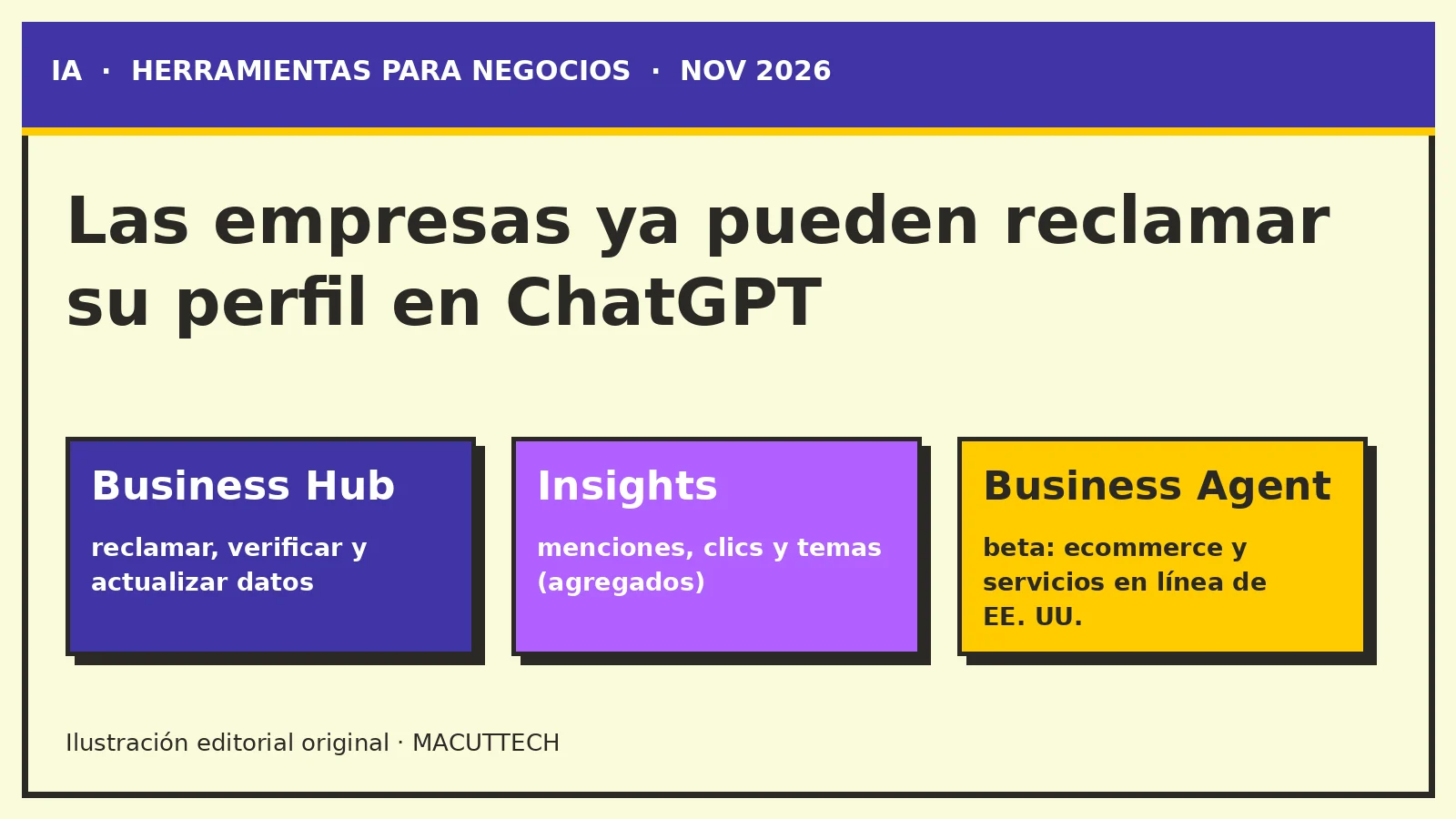
OpenAI presentó en beta Business Hub, para que las empresas reclamen y actualicen su perfil en ChatGPT y vean métricas agregadas, y Business Agents, por ahora solo para ecommerce y servicios en línea de EE. UU.
OpenAI launches Businesses in ChatGPT: companies can now claim their profile and launch agents
OpenAI introduced Business Hub in beta so companies can claim and update their ChatGPT profile and see aggregated insights, plus Business Agents, for now limited to US ecommerce and online service businesses.
El 10 de noviembre de 2026, OpenAI presentó en betaBusinesses in ChatGPT, un conjunto de herramientas para que las empresas gestionen cómo aparecen en ChatGPT. Según OpenAI, el servicio lo usan 1.200 millones de personas cada semana, y cada vez más lo usan para comparar productos y decidir compras.
1.200Millones de personas que usan ChatGPT cada semana, según OpenAI
4Formas de verificar el negocio: teléfono, correo, dominio o Shopify
BetaEstado en el lanzamiento (10 nov 2026)
Cómo funciona
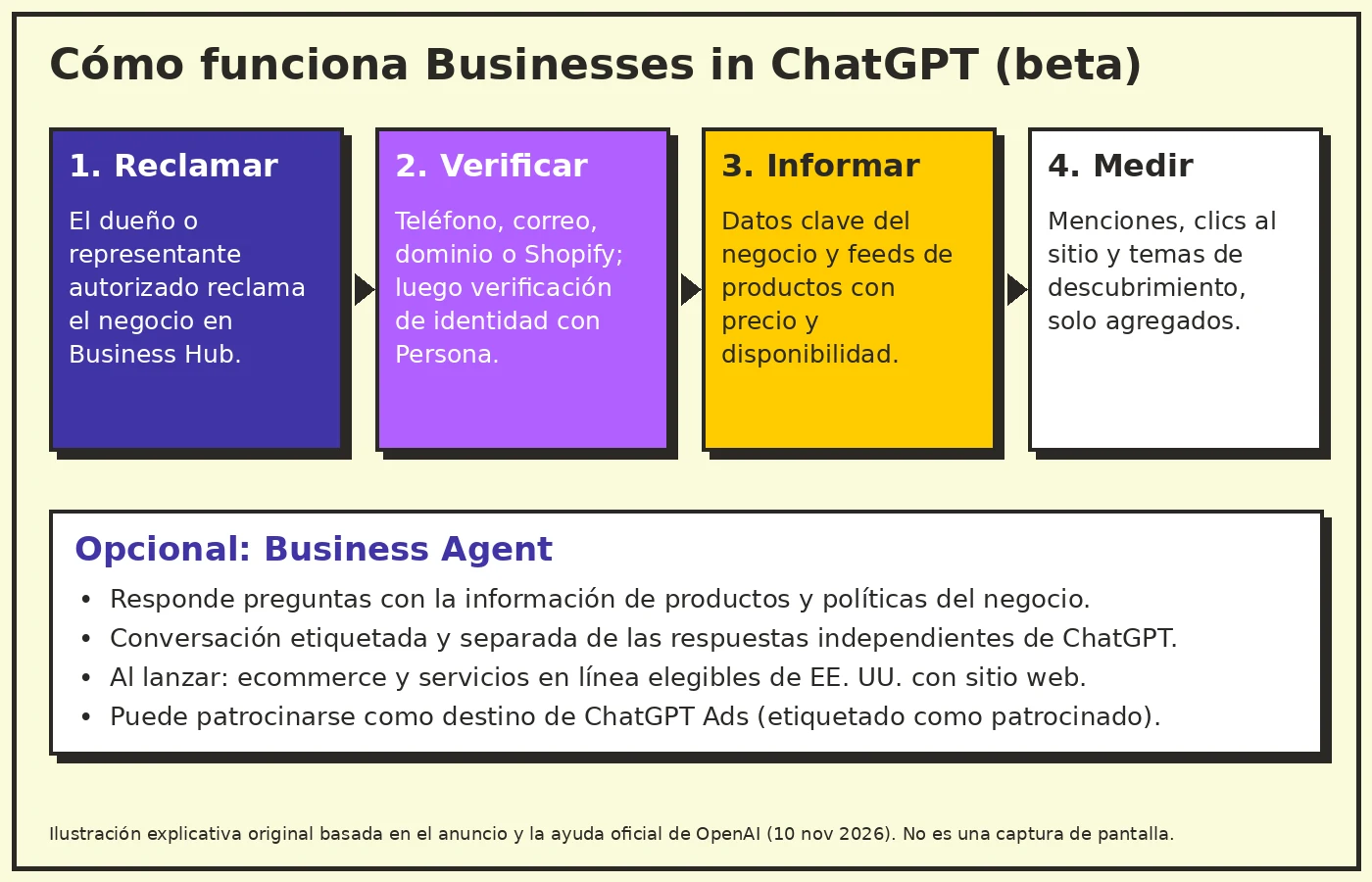
El punto de entrada es Business Hub. Allí, el dueño de un negocio o alguien autorizado para representarlo puede reclamar su empresa en ChatGPT y, una vez verificada, actualizar sus datos clave y cargar feeds de productos con precio y disponibilidad. La verificación puede hacerse con el teléfono, el correo, el dominio web o la cuenta de Shopify del negocio, y después quien administra el perfil pasa una verificación de identidad con Persona. No hace falta tener ChatGPT Enterprise ni una cuenta de anuncios.
Business Hub también muestra métricas agregadas: cuántas veces se menciona el negocio, cuántos clics recibe su sitio web y los temas de las conversaciones en las que se cita ese sitio. OpenAI aclara que no comparte las conversaciones de los usuarios con las empresas y que las métricas solo aparecen cuando hay suficiente volumen.
Paso 1 de 4
Reclamar
El dueño o un representante autorizado reclama la empresa en Business Hub.
1. Reclamar el negocio
En Business Hub, el dueño de un negocio o alguien autorizado para representarlo reclama su empresa en ChatGPT. No hace falta tener ChatGPT Enterprise ni una cuenta de anuncios.
2. Verificarlo
La verificación puede hacerse con el teléfono, el correo, el dominio web o la cuenta de Shopify del negocio. Después, quien administra el perfil pasa una verificación de identidad con Persona.
3. Informar datos y feeds
Una vez verificada, la empresa puede actualizar sus datos clave y cargar feeds de productos con precio y disponibilidad.
4. Medir
Business Hub muestra métricas agregadas: menciones, clics al sitio web y temas de las conversaciones en las que se cita ese sitio. Solo aparecen cuando hay suficiente volumen.
Ilustración explicativa original basada en el anuncio y la ayuda oficial de OpenAI (10 nov 2026). No es una captura de pantalla.
Business Agents
Después de reclamar su perfil, algunas empresas pueden crear un Business Agent: un asistente que responde preguntas con la información de productos y políticas que la propia empresa le da. El cliente decide si abre esa conversación, que aparece etiquetada y separada de las respuestas independientes de ChatGPT. Las empresas también pueden patrocinar su agente y usarlo como destino de ChatGPT Ads, con la etiqueta de patrocinado.
Por ahora, los agentes solo están disponibles para negocios elegibles de ecommerce y servicios en línea en Estados Unidos que tengan sitio web. Reclamar un perfil, en cambio, está abierto a negocios elegibles en los países donde ChatGPT funciona y la verificación está disponible. VentureBeat, citando a Digiday, informa que en el lanzamiento ambas funciones son gratuitas.
Comparativa
Perfil del negocio frente a Business Agent
Haz clic en un encabezado para ordenar. Datos del anuncio y la ayuda oficial de OpenAI; la gratuidad, según VentureBeat citando a Digiday.
Tema
Perfil en Business Hub
Business Agent
Quién puede usarlo
Negocios elegibles en los países donde ChatGPT funciona y la verificación está disponible
Negocios elegibles de ecommerce y servicios en línea en Estados Unidos con sitio web
Qué hace
Reclamar la empresa, actualizar datos clave, cargar feeds y ver métricas agregadas
Responde preguntas con la información de productos y políticas que da la empresa
Cómo lo ve el cliente
Datos del negocio en ChatGPT
Conversación opcional, etiquetada y separada de las respuestas independientes de ChatGPT
Publicidad
No hace falta una cuenta de anuncios
Se puede patrocinar y usar como destino de ChatGPT Ads, con la etiqueta de patrocinado
Precio en el lanzamiento
Gratis, según VentureBeat citando a Digiday
Gratis, según VentureBeat citando a Digiday
Por qué importa
Para cualquier negocio con presencia digital, esto suma un canal nuevo que cuidar junto al SEO y los perfiles en buscadores: mantener datos y catálogos al día también influye en cómo responde un asistente de IA. Vale la pena revisar si tu negocio ya aparece en ChatGPT y si la información que muestra es correcta.
Preguntas frecuentes
¿Necesito ChatGPT Enterprise o una cuenta de anuncios para reclamar mi negocio?
No. Según OpenAI, no hace falta tener ChatGPT Enterprise ni una cuenta de anuncios.
¿Cómo se verifica un negocio?
Con el teléfono, el correo, el dominio web o la cuenta de Shopify del negocio. Después, quien administra el perfil pasa una verificación de identidad con Persona.
¿OpenAI comparte las conversaciones de los usuarios con las empresas?
No. OpenAI aclara que no las comparte. Business Hub muestra métricas agregadas, que solo aparecen cuando hay suficiente volumen.
¿Quién puede crear un Business Agent?
Por ahora, solo negocios elegibles de ecommerce y servicios en línea en Estados Unidos que tengan sitio web. Reclamar un perfil está abierto a negocios elegibles en los países donde ChatGPT funciona y la verificación está disponible.
¿Cuánto cuesta?
VentureBeat, citando a Digiday, informa que en el lanzamiento ambas funciones son gratuitas.
Si quieres revisar cómo aparece tu empresa en buscadores y asistentes, o mantener al día tu catálogo y tus datos, te ayudamos a ordenarlo. Trabajamos desde Barranquilla, en remoto para LATAM.
<div class="mt-fx" data-mt-fx="rollout-businesses-in-chatgpt-business-hub-agent" aria-hidden="true"></div>
<p>On November 10, 2026, <a href="https://openai.com/index/introducing-businesses-chatgpt/" target="_blank" rel="noopener noreferrer">OpenAI introduced</a> <strong>Businesses in ChatGPT</strong> in beta, a set of tools that lets companies manage how they show up in ChatGPT. OpenAI says 1.2 billion people use ChatGPT every week, and more of them use it to compare products and make buying decisions.</p>
<div class="mt-fx-stats mt-fx-reveal" aria-label="Figures from the Businesses in ChatGPT announcement">
<div class="mt-fx-stat">
<span class="mt-fx-count" data-mt-count="1" data-mt-target="1.2" data-mt-decimals="1">1.2</span>
<span class="mt-fx-stat-label" lang="en" style="overflow-wrap:anywhere;hyphens:auto">Billion people using ChatGPT every week, per OpenAI</span>
</div>
<div class="mt-fx-stat">
<span class="mt-fx-count" data-mt-count="1" data-mt-target="4">4</span>
<span class="mt-fx-stat-label" lang="en" style="overflow-wrap:anywhere;hyphens:auto">Ways to verify the business: phone, email, domain or Shopify</span>
</div>
<div class="mt-fx-stat">
<span class="mt-fx-count">Beta</span>
<span class="mt-fx-stat-label" lang="en" style="overflow-wrap:anywhere;hyphens:auto">Status at launch (Nov 10, 2026)</span>
</div>
</div>
<h2 id="how-it-works">How it works</h2>
<p>The starting point is <strong>Business Hub</strong>. There, a business owner or an authorized representative can claim the company in ChatGPT and, once verified, update key details and upload product feeds with pricing and availability. Verification can use the business's phone number, email, website domain or Shopify account, and the person managing the profile then completes an identity check through Persona. No ChatGPT Enterprise agreement or ads account is required.</p>
<p>Business Hub also shows <strong>aggregated insights</strong>: how often the business is mentioned, how many clicks its website gets, and the topics of conversations where that site is cited. OpenAI says it does not share users' conversations with businesses, and insights only appear once there is enough volume.</p>
<div class="mt-fx-scrolly">
<div class="mt-blog-sticky-media mt-fx-scene" data-mt-scene="1">
<p class="mt-fx-scene-step" data-mt-scene-kicker="1">Step 1 of 4</p>
<p class="mt-fx-scene-value" data-mt-scene-value="1">Claim</p>
<p class="mt-fx-scene-label" data-mt-scene-label="1">The owner or an authorized representative claims the company in Business Hub.</p>
</div>
<div class="mt-fx-scrolly-steps">
<section class="mt-fx-step" data-mt-step="1" data-mt-scene-kicker="Step 1 of 4" data-mt-scene-value="Claim" data-mt-scene-label="The owner or an authorized representative claims the company in Business Hub.">
<h3>1. Claim the business</h3>
<p>In Business Hub, a business owner or an authorized representative claims the company in ChatGPT. No ChatGPT Enterprise agreement or ads account is required.</p>
</section>
<section class="mt-fx-step" data-mt-step="2" data-mt-scene-kicker="Step 2 of 4" data-mt-scene-value="Verify" data-mt-scene-label="Phone, email, website domain or Shopify; then an identity check through Persona.">
<h3>2. Verify it</h3>
<p>Verification can use the business's phone number, email, website domain or Shopify account. The person managing the profile then completes an identity check through Persona.</p>
</section>
<section class="mt-fx-step" data-mt-step="3" data-mt-scene-kicker="Step 3 of 4" data-mt-scene-value="Provide" data-mt-scene-label="Key details and product feeds with pricing and availability.">
<h3>3. Provide details and feeds</h3>
<p>Once verified, the company can update key details and upload product feeds with pricing and availability.</p>
</section>
<section class="mt-fx-step" data-mt-step="4" data-mt-scene-kicker="Step 4 of 4" data-mt-scene-value="Measure" data-mt-scene-label="Mentions, website clicks and conversation topics, only with enough volume.">
<h3>4. Measure</h3>
<p>Business Hub shows aggregated insights: mentions, website clicks and the topics of conversations where the site is cited. They only appear once there is enough volume.</p>
</section>
</div>
</div>
<figure class="mt-fx-reveal">
<img src="https://www.macuttech.com/uploads/uqbclD8dgTLRbU30klVhW-diagram-chatgpt-business-flow-en.webp" alt="Four-step diagram: claim the business, verify it, provide details and feeds, and measure; below, the optional Business Agent and its conditions" style="max-width:100%;height:auto;">
<figcaption>Original explanatory illustration based on OpenAI's announcement and help article (Nov 10, 2026). Not a screenshot.</figcaption>
</figure>
<h2 id="business-agents-en">Business Agents</h2>
<p>After claiming a profile, some companies can build a <strong>Business Agent</strong>: an assistant that answers questions using the product and policy information the company provides. Customers choose whether to open that conversation, which is clearly labeled and kept separate from ChatGPT's independent answers. Businesses can also sponsor their agent and use it as a ChatGPT Ads destination, labeled as sponsored.</p>
<p>For now, agents are only available to eligible <strong>US ecommerce and online service businesses</strong> with a website. Claiming a profile, by contrast, is open to eligible businesses wherever ChatGPT operates and verification is supported. <a href="https://venturebeat.com/technology/openai-lets-you-claim-your-business-in-chatgpt-and-set-up-a-custom-agentic-ai-customer-sales-rep" target="_blank" rel="noopener noreferrer">VentureBeat</a>, citing Digiday, reports that both features are free at launch.</p>
<div class="mt-fx-panel mt-fx-reveal">
<span class="mt-fx-kicker">Comparison</span>
<h3 class="mt-fx-panel-title">Business profile vs Business Agent</h3>
<p class="mt-fx-caption">Click a header to sort. Data from OpenAI's announcement and help article; pricing at launch per VentureBeat citing Digiday.</p>
<table class="mt-fx-sortable">
<thead>
<tr>
<th scope="col">Topic</th>
<th scope="col">Business Hub profile</th>
<th scope="col">Business Agent</th>
</tr>
</thead>
<tbody>
<tr><td>Who can use it</td><td>Eligible businesses wherever ChatGPT operates and verification is supported</td><td>Eligible US ecommerce and online service businesses with a website</td></tr>
<tr><td>What it does</td><td>Claim the company, update key details, upload feeds and see aggregated insights</td><td>Answers questions using the product and policy information the company provides</td></tr>
<tr><td>What customers see</td><td>The business's details in ChatGPT</td><td>An optional conversation, labeled and kept separate from ChatGPT's independent answers</td></tr>
<tr><td>Advertising</td><td>No ads account required</td><td>Can be sponsored and used as a ChatGPT Ads destination, labeled as sponsored</td></tr>
<tr><td>Price at launch</td><td>Free, per VentureBeat citing Digiday</td><td>Free, per VentureBeat citing Digiday</td></tr>
</tbody>
</table>
</div>
<h2 id="why-it-matters">Why it matters</h2>
<p>For any business with a digital presence, this adds a new channel to look after alongside SEO and search listings: keeping details and catalogs current also shapes how an AI assistant answers. It's worth checking whether your business already appears in ChatGPT and whether what it shows is accurate.</p>
<h2 id="faq">Frequently asked questions</h2>
<div class="mt-fx-faq">
<details>
<summary>Do I need ChatGPT Enterprise or an ads account to claim my business?</summary>
<p>No. According to OpenAI, no ChatGPT Enterprise agreement or ads account is required.</p>
</details>
<details>
<summary>How is a business verified?</summary>
<p>With the business's phone number, email, website domain or Shopify account. The person managing the profile then completes an identity check through Persona.</p>
</details>
<details>
<summary>Does OpenAI share users' conversations with businesses?</summary>
<p>No. OpenAI says it does not. Business Hub shows aggregated insights, which only appear once there is enough volume.</p>
</details>
<details>
<summary>Who can build a Business Agent?</summary>
<p>For now, only eligible US ecommerce and online service businesses with a website. Claiming a profile is open to eligible businesses wherever ChatGPT operates and verification is supported.</p>
</details>
<details>
<summary>How much does it cost?</summary>
<p>VentureBeat, citing Digiday, reports that both features are free at launch.</p>
</details>
</div>
<h2 id="sources">Sources</h2>
<ul>
<li><a href="https://openai.com/index/introducing-businesses-chatgpt/" target="_blank" rel="noopener noreferrer">Introducing Businesses in ChatGPT</a>, OpenAI, Nov 10, 2026.</li>
<li><a href="https://help.openai.com/en/articles/20001635-setting-up-your-business-on-chatgpt" target="_blank" rel="noopener noreferrer">Setting up your business on ChatGPT</a>, OpenAI Help Center.</li>
<li><a href="https://openai.com/business/businesses-in-chatgpt/" target="_blank" rel="noopener noreferrer">Businesses in ChatGPT: Claim Your Business</a>, OpenAI.</li>
<li><a href="https://venturebeat.com/technology/openai-lets-you-claim-your-business-in-chatgpt-and-set-up-a-custom-agentic-ai-customer-sales-rep" target="_blank" rel="noopener noreferrer">OpenAI lets you claim your business in ChatGPT…</a>, VentureBeat, Nov 10, 2026.</li>
</ul>
<div class="mt-fx-share" aria-label="Share this article"></div>
<h2 id="keep-reading">Keep reading</h2>
<div class="mt-fx-related">
<a class="mt-fx-related-card mt-fx-tilt" href="/blog/google-gemini-4-carbon-ciberseguridad?lang=en">
<span class="mt-fx-related-kicker">AI</span>
Google unveils Gemini 4 Carbon, its most powerful AI model, focused on cybersecurity
</a>
<a class="mt-fx-related-card mt-fx-tilt" href="/blog/forrester-wave-seguridad-desarrollo-agentes-ia-2026?lang=en">
<span class="mt-fx-related-kicker">Security</span>
Forrester publishes its Wave on security for agentic AI development
</a>
<a class="mt-fx-related-card mt-fx-tilt" href="/blog/alloydb-express-postgres-en-la-nube-listo-en-segundos?lang=en">
<span class="mt-fx-related-kicker">Cloud</span>
AlloyDB Express: cloud Postgres ready in seconds (and it pauses itself)
</a>
</div>
<div class="mt-fx-panel mt-fx-panel--yellow mt-fx-cta mt-fx-reveal">
<span class="mt-fx-kicker">MACUTTECH</span>
<h3 class="mt-fx-panel-title">Is your business ready for AI assistants?</h3>
<p>If you want to review how your company shows up in search and assistants, or keep your catalog and details current, we can help you get it in order. We work from Barranquilla, remotely across LATAM.</p>
<div class="mt-fx-cta-actions">
<a class="mt-fx-btn mt-fx-btn--violet" href="/en/quote">Request a quote</a>
<a class="mt-fx-btn mt-fx-btn--green" href="https://wa.me/573122215315" target="_blank" rel="noopener noreferrer">Message us on WhatsApp</a>
<a class="mt-fx-btn" href="/en/services">See services</a>
</div>
</div>
<div class="mt-fx-marquee" data-mt-marquee="1">
<button type="button" class="mt-fx-btn mt-fx-marquee-pause" aria-pressed="false">Pause</button>
<div class="mt-fx-marquee-track">
<a href="/blog/alloydb-express-postgres-en-la-nube-listo-en-segundos?lang=en">AlloyDB Express</a>
<span aria-hidden="true">//</span>
<a href="/blog/cabeceras-seguridad-http-guia-practica?lang=en">HTTP headers</a>
<span aria-hidden="true">//</span>
<a href="/blog/forrester-wave-seguridad-desarrollo-agentes-ia-2026?lang=en">Forrester Wave</a>
<span aria-hidden="true">//</span>
<a href="/blog/google-desmantela-botnet-xcpe?lang=en">XCPE botnet</a>
<span aria-hidden="true">//</span>
<a href="/blog/google-gemini-4-carbon-ciberseguridad?lang=en">Gemini 4 Carbon</a>
<span aria-hidden="true">//</span>
<a href="/blog/passkeys-inicio-de-sesion-sin-contrasenas?lang=en">Passkeys</a>
<span aria-hidden="true">//</span>
<a href="/blog/alloydb-express-postgres-en-la-nube-listo-en-segundos?lang=en">AlloyDB Express</a>
<span aria-hidden="true">//</span>
<a href="/blog/cabeceras-seguridad-http-guia-practica?lang=en">HTTP headers</a>
<span aria-hidden="true">//</span>
<a href="/blog/forrester-wave-seguridad-desarrollo-agentes-ia-2026?lang=en">Forrester Wave</a>
<span aria-hidden="true">//</span>
<a href="/blog/google-desmantela-botnet-xcpe?lang=en">XCPE botnet</a>
<span aria-hidden="true">//</span>
<a href="/blog/google-gemini-4-carbon-ciberseguridad?lang=en">Gemini 4 Carbon</a>
<span aria-hidden="true">//</span>
<a href="/blog/passkeys-inicio-de-sesion-sin-contrasenas?lang=en">Passkeys</a>
<span aria-hidden="true">//</span>
</div>
</div>